S&P 500 Stock Market Gamma Trading Levels Based on Options Open Interest
FOR OPTIONS AND EQUITY TRADERS
Trade With the Flow — Not Against It
Tape streams real-time options data for 3,500+ tickers, letting you track the direction, conviction, and size behind every trade — so you can stop guessing and start trading with context.
as seen in





Stop Guessing & Start Trading with Real-Time Market Context
“Tape was great. Helped see what folks are doing in real time...Scalped BABA calls at the open for a nice profit.”
- samuel v., SpotGamma Subscriber
Tape Provides the Market Context You Need
With live options flow data from Tape, you can see directly how traders are positioned — quickly understanding the direction, magnitude, and conviction behind each trade.
Tape pulls back the curtain on the options market in real time, surfacing the trades that deliver the most significant impact across 3,500+ stocks, ETFs, and indices. Using insights from live order flow data, gain the clarity needed to trade with confidence.
What’s Included in Tape?
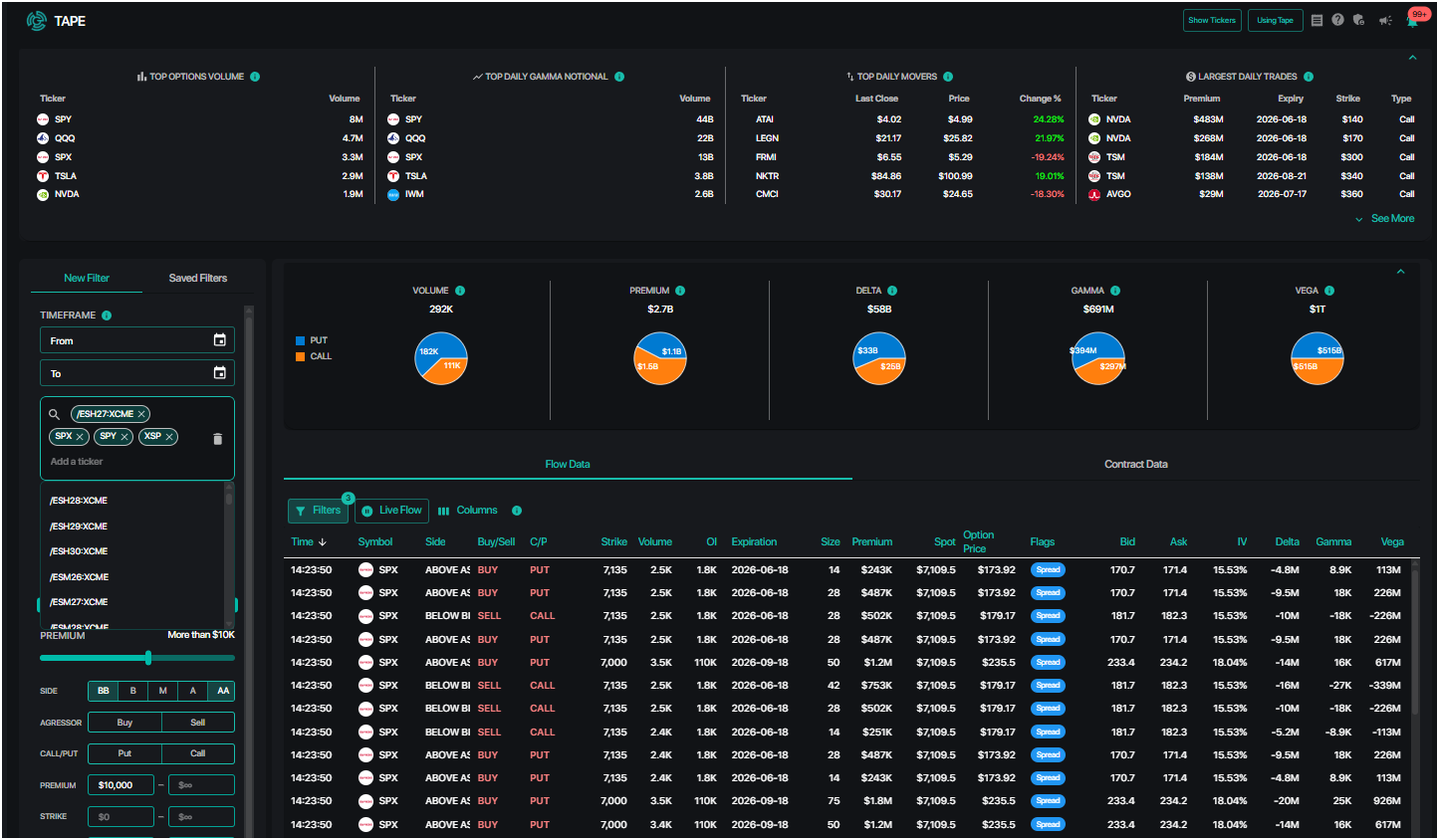
Through multiple charts and tables, Tape provides both a comprehensive summary and detailed views of the options market.
Component
What It Shows
How It Supports Your Trading
Flow Data
A live stream of every listed US options transaction, with full trade detail: ticker, strike, expiration, premium, size, side, direction, plus identifiers of sweep, cross, or block trades
Know the direction, conviction, and size behind each transaction — helping you confirm your own trade hypothesis based on live options data
Summary Charts
Aggregated flow totals including volume, premium, delta, gamma, and vega — broken out by puts and calls, based on current filter settings
Assess the directional outlook and potential hedging activity behind a single name, a watchlist, or the entire market at a glance
Contract Data
Options transactions aggregated at the contract level by strike and expiration, sortable by volume, premium, or cumulative greek values
Discover the specific contracts that are most significant, and where traders are concentrated
Highlights
Four screeners at the top of Tape displaying the names with the top options volume, most daily gamma notional, biggest daily moves, and largest daily trades
Surface names and trades that are worth exploring each day — with updates every 30 seconds informing you of new trading opportunities
Filters
20+ customizable metrics for each trade, so you can drill down based on the names you follow, the size of each trade, and any parameter of the individual option — with the ability to save your selection for future reference
Narrow down from millions of options transactions to only display the trades that matter most, tailored to fit your trading style
Three Ways to Incorporate Tape Into Your Trading
Filter the flow data within Tape for short-dated expirations and set a minimum premium threshold. Watch for repeated call-buying near a recent low, or put-buying near a recent high. The direction, size, and order side of each trade can reveal whether traders are positioning for a continuation or reversal. Flow for a specific name that is consistent, directional, and high-conviction can support a trade hypothesis.
If you are already watching a name and considering entering a position, filter Tape to just show that name and check the Contracts Data tab. Sort by volume and premium to narrow in on the strikes that are attracting the most activity today. Confirm whether the contracts with the highest volume align with your directional view before submitting a trade.
To better understand key drivers of price action for a given session, scroll through the flow data for a specific ticker to see the types of trades that were made. For higher volume names, it may be useful to apply a premium filter as well. Look for patterns in the direction, expiration, and size of trades from that session to discover how traders were positioning throughout the day.
How Flow Data Complements the SpotGamma Toolkit
Tape is built to work alongside the rest of the SpotGamma platform. There are several effective use cases when you combine flow data from Tape with context from other tools in the SpotGamma ecosystem.
Alongside HIRO
HIRO tracks the real-time hedging impact of options on the underlying stock, while Tape shows the specific trades behind that directional pressure. Flow data from Tape can be viewed directly below the HIRO chart, revealing which trades drove buying or selling pressure reflected in HIRO. For example, when the HIRO indicator rises from call-buying, Tape shows the specific expirations being bought and how much premium is being paid for those calls, confirming the conviction behind the move.
Alongside Equity Hub
Equity Hub surfaces key structural levels — the strikes where options market positioning is likely to establish support or resistance. Tape shows the live flow accumulating around those strikes in real time. When price is near a key level, watch for large directional order flow in Tape to confirm whether price is likely to break past the level or reverse.

Alongside FlowPatrol
Tape shows individual trade-level flow as it happens, while FlowPatrol shows highlights from true buy-side positioning the next morning. When an unusual pattern or high-conviction trade appears in Tape, FlowPatrol provides context to confirm whether that position reflects genuine directional conviction.
SpotGamma Essential:
Everything You Need To Elevate Your Trades
$99/mo
join spotgamma
Tape sheds light on the direction, size, and conviction behind major trades, empowering you with real market context
Tape can be unlocked with a SpotGamma Essential subscription — subscribe today for instant access to Tape, alongside SpotGamma’s pre-market key levels, twice daily Founder’s Note, powerful scanners, and engaged community with thousands of traders.
unlock spotgamma Essential
Subscribe now to get instant access.
Related Resources
Sharpen Your Skills – Tape: Follow the Flow in Real Time
Support Center — What is SpotGamma Tape?
Support Center — What Does the Tape Flow Data Section Show?
Support Center — What Does the Tape Contract Data Show?
Support Center — What Are the Tape Scanners?
Support Center — What Do the Flags in Tape Mean?
SpotGamma Tape User Guide (PDF)
Tape FAQ
What does Tape actually show me?
Tape shows real-time data on every options transaction across 3,500+ US-listed stocks, ETFs, and indices. For each transaction, Tape shows the ticker, whether it was a call or put, the strike, expiration date, premium paid, number of contracts, whether it was bought or sold, and whether it printed at the bid, ask, or mid. Tape also flags the structure of each trade — Sweep, Block, Cross, or Multileg.
Who is Tape for?
Tape is most useful for active options traders, equity traders who want to better understand the impact of flow data on their trades, and any trader looking to incorporate options data into their decision-making. Tape covers options flow for individual equities, ETFs, and indices — making it relevant across a range of trading styles and asset classes.
Is Tape real time?
Yes, the Flow Data stream and Contract Data update in real time during market hours. The Highlights scanners at the top of the page refresh approximately every 30 seconds, measured from the prior day's close.
How do I know if a trade is bullish or bearish?
Direction is inferred from the combination of call/put and whether the order was a buy or sell. Call buying or put selling generally indicates a neutral-to-bullish outlook. Put buying or call selling generally indicates a neutral-to-bearish outlook. No single trade is definitive — what matters is the pattern across multiple trades: one-sided, repeated, large, and sustained flow can often be used as a directional indicator.
What does conviction look like in the flow data?
Three things tend to indicate higher conviction behind a trade: large premium (more capital at risk), orders filled at or above the ask on calls — or at or below the bid on puts — and longer-dated expirations. A large block trade with a six-month expiration filled above the ask carries meaningfully more informational weight than a small, short-dated order at mid.
What's the difference between a Sweep and a Block?
A Sweep is a large order broken into smaller pieces and routed simultaneously across multiple exchanges — typically to fill quickly without tipping off the full size. A Block is a large, privately negotiated trade executed outside of the public exchange system. Both are associated with larger, more deliberate positioning. Sweeps suggest urgency, while Blocks suggest size. A Multileg flag indicates the trade is part of a broader strategy involving two or more contracts simultaneously.
What does the Cross flag mean?
A Cross indicates that the buy side and sell side of a specific trade matched exactly — the orders cancel each other out in terms of net market exposure. Cross trades are typically less informative directionally and can be filtered out when looking for one-sided conviction.
What are Summary Charts and when should I use them?
Summary Charts aggregate the full Flow Data table into visual breakdowns based on the current filters set. These charts show the total volume, total premium, net delta, net gamma, and net vega, split between puts and calls. The Summary Charts provide a directional read on the overall flow for a specific name, a basket of tickers, or the whole market.
What is Contract Data and how is it different from Flow Data?
Flow Data shows every individual transaction as it happens. Contract Data groups those same transactions at the contract level — by ticker, call/put, strike, and expiration — to show which specific contracts are attracting the most activity in aggregate. Sort by volume, premium, delta, or any other greek to find where significant positions are building. When a specific strike keeps accumulating volume throughout the session, that level tends to be worth watching.
How do I filter Tape to focus on specific names I want to track?
Use the Filters panel on the left side of the Tape page. Type in specific tickers to limit the flow data to those names, or select from a saved Watchlist using the dropdown in the top left. SpotGamma Scanners can also populate the ticker list automatically — selecting a scanner adds all associated names to the filter.
Can I save my filter settings?
Yes, once the filter parameters are configured, select Save Filter at the bottom of the filter panel. Saved filters return to the same configuration at the start of the next session, so a regularly used setup — for example, a specific watchlist with a minimum premium threshold and short-dated expiration filter — does not need to be rebuilt each day.
Where does the Tape flow data appear besides the Tape page?
The Flow Data and Contract Data tabs are also available directly beneath the HIRO chart window. This allows traders to view the live options flow stream and the HIRO indicator in the same view simultaneously — so the specific trades influencing the HIRO reading are visible without switching pages.
How do trades that show up in Tape relate to FlowPatrol?
Tape shows every option transaction as it happens, including market-maker activity. FlowPatrol filters for true buy-side positioning — which can help separate directional trades from hedging and market-maker flow. When an unusual or repeated pattern surfaces in Tape, FlowPatrol can confirm the trade and provide additional context to assess whether the activity reflects genuine buy-side positioning.